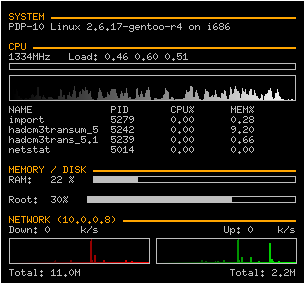
 If you run a Linux desktop you need to be using conky. It compiles all those shiny gadget you see on other desktops eating system RAM, down to what you need; information on what your system is doing. So try it out, install conky, and then drop this into your home directory as .conkyrc - then run conky. The file is pretty self explanatory, enjoy!
# Create own window instead of using desktop (required in nautilus)
own_window yes
own_window_hints undecorated,below,skip_taskbar
background no
# Use double buffering (reduces flicker, may not work for everyone)
double_buffer yes
# fiddle with window
use_spacer yes
use_xft yes
# Update interval in seconds
update_interval 3.0
# Minimum size of text area
minimum_size 400 5
# Draw shades?
draw_shades yes
# Text stuff
draw_outline no # amplifies text if yes
draw_borders no
uppercase no # set to yes if you want all text to be in uppercase
# Stippled borders?
stippled_borders 8

# border margins
border_margin 4
# border width
border_width 1
# Default colors and also border colors, grey90 == #e5e5e5
default_color white
default_shade_color black
default_outline_color white
own_window_colour brown
own_window_transparent yes
# Text alignment, other possible values are commented
alignment top_left
#alignment top_right
#alignment bottom_left
#alignment bottom_right
# Gap between borders of screen and text
gap_x 10
gap_y 10
# stuff after 'TEXT' will be formatted on screen
override_utf8_locale no
xftfont Terminus:size=8
xftalpha 0.8
TEXT
${offset 0}${color slate grey}${time %a, } ${color }${time %e %B %G}
${offset 0}${color slate grey}${time %Z,    }${color }${time %H:%M:%S}
${offset 0}${color slate grey}UpTime: ${color }$uptime
${offset 0}${color slate grey}Kern:${color }$kernel
${offset 0}${color slate grey}CPU:${color } $cpu% ${acpitemp}C
${offset 0}${cpugraph 20,130 000000 ffffff}
${offset 0}${color slate grey}Load: ${color }$loadavg
${offset 0}${color slate grey}Processes: ${color }$processes
${offset 0}${color slate grey}Running:   ${color }$running_processes
${offset 0}${color slate grey}Highest CPU:
${offset 0}${color #ddaa00} ${top name 1}${top_mem cpu 1}
${offset 0}${color lightgrey} ${top name 2}${top cpu 2}
${offset 0}${color lightgrey} ${top name 3}${top cpu 3}
${offset 0}${color lightgrey} ${top name 4}${top cpu 4}
${offset 0}${color slate grey}Highest MEM:
${offset 0}${color #ddaa00} ${top_mem name 1}${top_mem mem 1}
${offset 0}${color lightgrey} ${top_mem name 2}${top_mem mem 2}
${offset 0}${color lightgrey} ${top_mem name 3}${top_mem mem 3}
${offset 0}${color lightgrey} ${top_mem name 4}${top_mem mem 4}
${offset 0}${color slate grey}MEM:  ${color } $memperc% $mem/$memmax
${offset 0}${membar 3,100}
${offset 0}${color slate grey}SWAP: ${color }$swapperc% $swap/$swapmax
${offset 0}${swapbar 3,100}
${offset 0}${color slate grey}ROOT:    ${color }${fs_free /}/${fs_size /}
${offset 0}${fs_bar 3,100 /}
${offset 0}${color slate grey}HOME:  ${color }${fs_free /home}/${fs_size /home}
${offset 0}${fs_bar 3,100 /home}
${offset 0}${color slate grey}NET:
${offset 0}${color}Up: ${color }${upspeed eth0} k/s
${offset 0}${upspeedgraph eth0 20,130 000000 ffffff}
${offset 0}${color}Down: ${color }${downspeed eth0}k/s${color}
${offset 0}${downspeedgraph eth0 20,130 000000 ffffff}